WedShare * Daily is brought to you by the creative force behind personal wedding website service WedShare.com and contributing bloggers passionate about each of their own areas of focus and expertise in wedding planning and the wedding industry.
Online planning resources
{ Wedding Tech } is our blog's niche, but our contributors also cover all things wedding: eco-friendly ideas, inspirational boards, real weddings, and more.
Have comments? See a photo or quote we have improperly credited? Found a product, service, or vendor you would like us to review and blog about? Let us know!
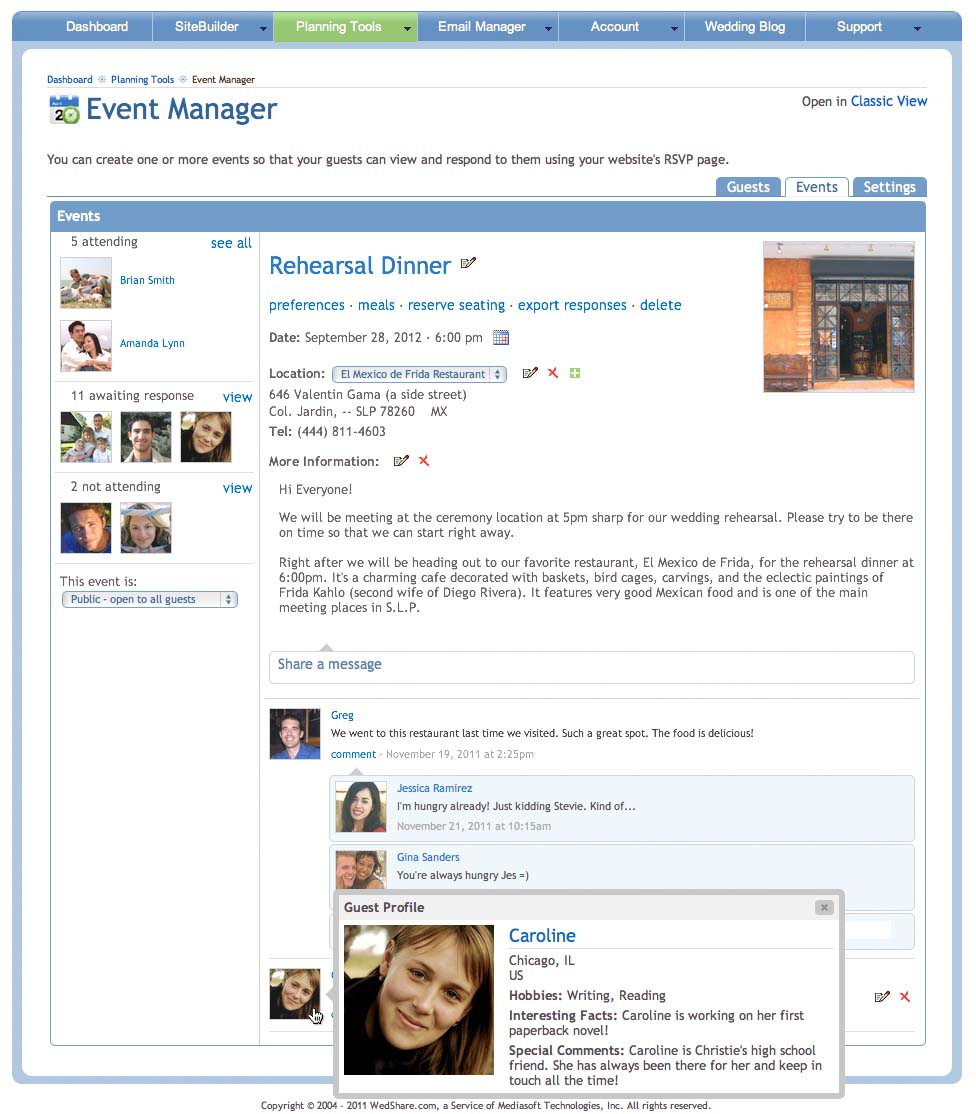
WedShare.com has just released the beta version of WedShare for Facebook, a new Facebook application that will allow you to associate your guests with your Facebook friends, share your events on Facebook, and more!
The WedShare for Facebook Guest Manager associates your guests and Facebook friends
WedShare for Facebook is actually a new wedding planning client with its own applications, or “apps”, that integrate with your WedShare personal wedding website. It’s a good chance that many–if not most–of your wedding guests are Facebook friends as well. The WedShare for Facebook Guest Manager integrates with your standard WedShare Guest Manager and automatically maps your friends to your guests.
Here I’d like to pause for a disclaimer: WedShare for Facebook is a brand new client, and it’s being released as a beta add-on feature to WedShare. This means that it’s still actively being built, actively being debugged, and is in no way, shape, or form a finished product. But the currently available apps are stable, and WedShare is encouraging its Facebook-connected members to give it a try, and see what you think. Suggestions and feedback are appreciated!
Your WedShare for Facebook dashboard. Two applications are live in the beta release
The WedShare for Facebook dashboard is for brides, grooms, and guests. If you’re planning your big day, you’ll see the available planning apps as icons, and if you’re a guest, you’ll be able to view and submit an RSVP for any events you’re invited to. Everything is integrated to your wedding website, so if you modify something on Facebook, it updates on your wedding website, and vice-versa.
The apps currently available in the beta release are the Guest Manager and Event Manager. WedShare has more on the way, but wants to get these two important features well-used and well-tested by members first.
Manage your events and share them with Facebook friends
You don’t need a WedShare wedding website to use WedShare for Facebook, but the great thing about it–if you do–is that both clients are integrated in real time. If a guest who is also a Facebook friends submits an RSVP on Facebook, your website’s RSVP page updates, too.
Another feature is the optional My WedShare tab on your Facebook profile. Choose which content from your planning apps and personal wedding website to also include here. It’s a great way to share the big day details! Currently, only the Event Manager planning app is included (guests can RSVP from here, too!), but more options are on the way.
Share your wedding details and allow RSVPs, right on your Facebook profile
In addition to usability, suggestions are also welcome for the final name of the application and the profile tab. A discussion board is available at the application profile page for the purpose, and as always, feedback is welcome on the WedShare profile page as well: facebook.com/wedshare.
Here’s an interesting idea I came across that you may want to check out. Wedzines is a company that will create a professionally designed wedding magazine just for you and your special day. Part showcase, part wedding program, part photo album, it’s your very own “publication” to celebrate your wedding.
A lot of the content on your wedding website could be incorporated easily in print form. And I especially like the idea of this as a carry-along guide for a destination wedding, or if you have several guests coming from out of town: lots of great stuff on the location could be highlighted in the “editorial” for your guests to peruse and use as a guide, along with all the great photos and stories about you and your sweetheart.
An interesting idea. Check out Wedzines.com for more information, quotes, and to see samples. And if anyone has used the service, I’d be interested to hear how you liked the results.
For those couples who like to post YouTube videos to their wedding websites, here’s something just released that may be of interest to you. YouTube has launched a cloud-based video-editing tool to enable people to edit their videos online before publishing them on the video-sharing website.
The YouTube Video Editor will allow you to combine more than one video together, and can also be used to trim sections of the video to shorten it. You can even add a sountrack! The easy one-click publishing feature lets you publish your edited video to YouTube immediately.
Video-sharing service YouTube unveiled a new online video editor designed to allow easy editing of clips before publishing
“The editor is ideal for merging single, short clips in to a longer video,” said Rushabh Doshi, a Google software engineer, and Joshua Siegel, a Google product manager, in a YouTube blog post. “For example, you can transform clips from your vacation in to a video travel diary set to music, or create a highlights reel from footage of your last basketball game.
“It’s also great for trimming a long video down to the moments you really care about. Say you’ve uploaded a wedding ceremony – a beautiful event, but do you really need to see all the guests shuffle in? The video editor lets you easily remove unwanted footage so you can capture just the moment when they say, ‘I do’.”
Looks like a promising tool for working with online videos. If you have a lot of uploaded clips you’re managing, check it out to see if the new editor will help out.
Have a great weekend!
Photo Credits: Screenshot from Youtube via telegraph.co.uk
Looking to give your big day photos a special finishing touch? How about having them printed on canvas, just like a priceless piece of art?
Love & Canvas is a brand new service created by members of an experienced photo-to-canvas printing company. Its focus is exclusively on helping nearlywed and newlywed couples print their wedding and engagement photos on canvas. Love & Canvas’s high-quality printers can print sizes up to 63″ x 42″, and they offer both rolled and gallery-wrapped mounting options.
Putting your photos on canvas is easy: just upload, select your specifications, and order. You can select your choice of mounting options, including rolled canvas (the most economical: just your canvas rolled up to be mounted on your own) and gallery-wrapped, which includes mounting hardware and a specialized coated finish.
Mounting options include rolled (left) and gallery-wrapped (right) with coated finish
Looks like a fantastic idea for showcasing your most cherished memories. Check it out!
I’ve often referenced personal wedding websites as a great tool for getting information out to your guests. It centralizes all your information in one universally accessible place, and is a great alternative to expensive, bulky mailed invitation enclosures.
Another invaluable tool for keeping guests current on important updates or wedding-related news–such as a last-minute scheduling change–is an email mailing list service.
Such a service lets your guests sign themselves up to receive important updates by email. It should provide a mechanism for guests to unsubscribe if they like, and an interface where you can easily post your updates and notices.
It makes sense for both your mailing list and wedding website to function together, centralizing all the information as well as the mailing list tools. You can request guests to sign up for your mailing list, with a link to the sign-up form, on your website’s home page.
WedShare’s pre-designed News and Updates page makes it easy to create and maintain your own mailing list service. You easily post important updates to this page with the same full-featured interface you use to create page content, and each entry will be automatically sent to your registered mailing list. Plus, you can designate any notice as a home page alert; such alerts will pop up on your website home page to get the attention of guests who may not have added themselves to your list yet.
Easy setup options for your own mailing list service on the WedShare control panel's News and Updates page. Also available is a link to view and manage all recipients in your current list
Any individual mailing list broadcast can also be added as an alert to your wedding website's home page. You can also specify the alert to be removed after a certain number of days.
Guests can easily subscribe or unsubscribe to your mailing list
Posts you designate as an alert are displayed to all visitors to your wedding website
A major part of your wedding planning will be communication, so don’t neglect this very convenient and helpful tool!
I’ve noticed a lot of couples jumping head-first into the online wedding planning pool without first taking necessary steps to safeguard their privacy–specifically, their personal email address.
Do not, I repeat: do not, use your personal email address for any of the endless online registrations you will be asked to fill out on wedding planning sites. The Knot, Weddingchannel, et. al will promptly begin sending you a barrage of unsolicited emails. Some of these are useful…discounts and special offers, for example…but you really don’t want this clutter in your personal inbox. And once the tidal wave starts, it’s next to impossible to stop.
The solution? Create a wedding-specific email address before you even begin, and use this address to fill out as many online forms, contests, registrations, vendor requests, etc. as you like. When the big day is over, you can close the email address and be done with it. It still surprises me how many couples don’t bother to take this simple step.
You can use a public Gmail, Hotmail, or Yahoo! address for this purpose if you like. Or, use WedShare’s email service to create your own email addresses at your wedding website! You’ll automatically be set up with your own webmail browser, and you can connect it to an offline reader like Outlook if you prefer.
Creating your own email address is easy: just access the Email Manager from your WedShare control panel, and enter in the address as you’d like it to read. It will automatically be set up at your website. So if your website is CristieAndSteve.com, you could create an email address like cristie@CristieAndSteve.com, for example.
Create your own wedding-specific email addresses at your website easily with WedShare's Email Manager
Your personal webmail
That’s it! Your email address is now ready to go. To access and customize your email’s online web interface, log in with the temporary password you’re given. All WedShare members have their own personal online web interface, accessible from anywhere you have web access. Just browse to your wedding website appended by ‘/mail’, like: cristieandsteve.com/mail.
You can send and read emails, create and manage folders and filters, create a contact list, plus lots of other great stuff right on your own personal webmail interface. Customize the look and feel, fonts, colors, and behavior of your webmail, too.
Manage emails at your own personal webmail browser
Another mistake I often see couples make is posting their email address(es) on their website or other online correspondence. Because the web is a public medium (unless you password-protect your website or require authentication, another topic), then your posted email can possibly fall into the hands of a spammer or some other online vermin.
But how can you accept emails if your guests and vendors can’t find your email address on your website? Use an online form, like WedShare’s Contact Us page. This will hide your email address from website viewers, while still providing them a means to send you emails. You can then choose who to respond to, who to ignore, and who to block outright.
Set your names and contact email addresses where "Contact Us" correspondence will go
The Contact Us form on your website allows visitors to pick a contact for their message, while protecting your email addresses. Never post your personal email address in the clear!
Remember that you can never be too careful when it comes to your privacy. That’s it for today; have a great weekend everyone!
Monetary gift registries, also called cash registries, are a growing trend as a wedding gift alternative. They’re convenient for both you and your guests, combining the ease of a cash contribution with the thoughtfulness of a selected gift. The basic idea is an online list of items (i.e. contribution towards a home downpayment, school tuitition, and so forth) that your guests can choose from, and “buy” for you. Their cash gift is typically handled online via a credit card payment, and the proceeds are credited towards the specific item or items they select. You simply cash out the lump sum.
A honeymoon registry is just a monetary gift registry specific to your honeymoon. Thus, items might include contribution towards airfare, a hiking excursion, spa treatment, champagne brunch, or so forth. It lets guests choose specific components of your honeymoon they’d like to sponsor, and it gives you cash to help foot the bill. And when writing your thank-you cards, you can let them know how much you enjoyed their sponsored brunch or hike rather than just thanking them for the green.
There are a number of honeymoon registry services you can find on the web, but they do charge a fee, normally calculated as a percentage of your overall gift amount. A 5% - 8% fee is pretty common. Another option is to create your registry yourself, with features already available on your WedShare wedding website. Your website’s Gift Registry page is integrated with the online credit card merchant PayPal, and having everything available right on your wedding website makes it easier for your guests to find.
Want to set up yours fast and easy? Here are the steps…
Get a Free PayPal Account
PayPal is a popular, trusted service that will allow your guests to use any major credit card to purchase your item(s) in a safe online environment. You have access to the funds right away, and PayPal’s account interface allows you to transfer the gift directly to your bank account.
To work for your honeymoon registry, your PayPal account needs to be a Premier Accountor a Business Account. Both will work, and both are free to create. You select the account type when you set up the account for the first time. Go to PayPal.com to create your account, if you have not already. You can choose “Premier” when selecting the account type, as shown below.
Create a free PayPal account for your registry
Fill out the account creation form, and specify an email address for the new account. You’ll use this email address to identify your PayPal account when linking it to your honeymoon registry. Let’s move onto that next.
Create a WedShare Monetary Gift List
Log into your website’s control panel and edit your Online Gift Registry page by clicking its edit icon. Scroll down to the Monetary Gift Lists section and enter in a name for your registry to create it:
Create a monetary gift list on your website's Online Gift Registry page
Next, edit your new registry’s preferences so you can link it with your PayPal account. Click the Preferences tab, locate the “Allow PayPal” checkbox, and check it. In the field for “Your PayPal Email Address”, enter in the email address you used to create your PayPal account:
Add your PayPal email address in the preferences of your new honeymoon registry
Click the “Save” button to save your changes. You’re almost finished…now it’s just a matter of adding the items.
Create Your Registry Items
In order for your guests to be able to sponsor your honeymoon, you’ll need to create items they can purchase. These can be anything you like: a spa treatment, candlelight dinner for two, you name it. Perhaps you’d like to split a honeymoon item so more than one guest can contribute to it–or provide an open amount contribution option. It’s your honeymoon registry, and your call.
To add an item, click the Items tab and enter in details for a new honeymoon item. When deciding what to add, you can click the “Examples” link to see some example items if you like.
Create items for your registry
You can always edit an item by selecting its Edit link from your item list. Click “Add Image” to upload any image as a graphical icon. To move an item up or down in your list, use the green arrows on the left. You can also place your items in categories if you like, such as “Travel”, “Exploration”, “Dining”, “Entertainment”, and so forth.
Edit registry items to add icon photos and other properties
Repeat for all the items you’d like to set up. Now, when guests browse to your wedding website, they’ll be able to view and use your new honeymoon registry! Gifts will go to your PayPal account for withdrawal (see below). Here’s our sample registry, which you can see live at the WedShare online demo:
Our honeymoon registry, published and ready for use on our wedding website
Managing Purchases
To see who has purchased your items at any time, click the Purchase History tab. You can also log into your PayPal account to view your balance, withdraw money to your bank, and view your purchase history there as well.
Using PayPal, you can check your balance and withdraw at any time
Now you have a fully functional honeymoon registry, right on your wedding website, live and accepting gifts from your guests!
The planning end game is on. You’re working with your guest list to arrive at a final headcount, contacting everyone who hasn’t sent in an RSVP, and managing the number of adults and children. Sending the meal count for each menu option to your caterer. Dealing with who should (and shouldn’t) sit next to who at the reception. Drawing up a seating chart. Redoing the chart. Blowing away the eraser dust and redoing it again.
Handling all the last minute to-do items is no easy task, to be sure. Luckily, there are a number of online tools that you can take advantage of to save your time and sanity while juggling all the details, and I cover some of them in my previous post: Finalizing Your Wedding Guest List and Seating Plan.
If you haven’t read it, I encourage you to check it out, as there are some great tips included. In that post, I also introduced the downloadable seating chart builders Perfect Table Plan and Seating Arrangement For Weddings, both of which allow you to go from guest list to a visual seating plan layout with point-and-click ease. And for those who think their old-school pencil & paper will serve them as well or better, I say to each his or her own. But you just don’t realize how much of a convenience these tools offer until you try them.
Using Perfect Table Plan to set seating preferences, including guests you absolutely don't want seated together and those you do. An auto-seating wizard takes it from there.
Seating Arrangement for Weddings lets you create seating charts and print reports for free
Another great tool available is Top Table Planner, an easy to use drag-and-drop seating layout designer. This one has the added bonus of being completely online, so there’s no software to download (one disadvantage of Seating Arrangement For Weddings is that it doesn’t run on a Mac). Its intuitive interface allows you to select and arrange various table types, and assign guests to specific seating with ease.
Add and edit your guest lists
Design your layout and assign guest seating
Top Table Planner lets you set up various table types and sizes, indicate meal choices and RSVPs, add other reception elements like a dance floor and cake table, and print place cards and other reports. Because it’s online, it’s compatible with any Internet-ready computer, and pricing starts at just $20 US. They also provide a free trial, so you can take the service for a spin first. Definitely worth checking out.
Photo Credits: Screenshots from perfecttableplan.com, seatingarrangement.com, and toptableplanner.com
I hope everyone had a great Easter weekend! I just wanted to share a tool I recently came across that you may find useful, especially if you’re still in the color coordinating stages of your planning. Chicago-based rental company BBJ Linen offers a “Design Your Event Table” tool that I think could be especially useful in your quest to find the perfect combination for your reception tables. Your venue or rental company should be able to show you plenty of table design setting examples as well, but more inspiration is always better than less, so check this out if you get a chance.
Point-and-click your way to a table setting design with BBJ Linen's online Design Your Event Table tool
The menu across the top of the page allows you to identify various aspects of the design, like table covers and runners, napkins, chair pads and covers, and so forth. On the left are swatches to pick from. There is also a collection of “Recommended Combinations” to give you some complete examples. There are some pretty funky combinations on here, but it could help nudge your muse.
If you run your mouse cursor over the elements of your virtual setting, the individual items will highlight and provide a detail popup, including BBJ Linen’s per-table price for the item.
Edit individual items
Also provided at the bottom of the page is a breakdown of BBJ Linen’s per-table cost for your entire combination as you build it, so you can see how certain added items impact total cost. It can be helpful to anticipate what your own rental company might propose.
Have fun playing with it, and I hope it helps your planning efforts!
Want to try something with a little more geek chic flair than the traditional sign-in guestbook at your wedding reception? How about a video guestbook kiosk that your guests can approach at their leisure to leave you personalized congratulations for viewing later or even incorporating into your wedding video?
I found this mentioned over at the Letterpress Wedding Invitations Blog and thought it was a fun idea to share. The basic technical requirements are just a Mac computer and webcam (a standalone iMac with built-in webcam is perfect) and software made for the purpose; in this case, Thrilled for You Video Guestbook available online for $99. The software allows an unlimited number of high-quality video messages to be recorded by your guests.
Guests approach the kiosk, enter their names, and click "Record" to start. Their video appears in the box as it is recording, and they are provided options to preview, re-record, and save afterwards.
The setup lets your guests enter their names and record their video message to you with point-and-click ease. They can preview and re-record if they prefer, until they’re happy with the message they’re sending. With a booth like this available all reception long, you’ll be sure to gather some very entertaining material from your guests! Use along with, or in the place of, a traditional signed guestbook to capture your loved ones’ best wishes like never before!
Check out the Thrilled For You website for more information and to download a free demo.